Build SomethingLegendary
The Glyph Editor
// Welcome to the Family

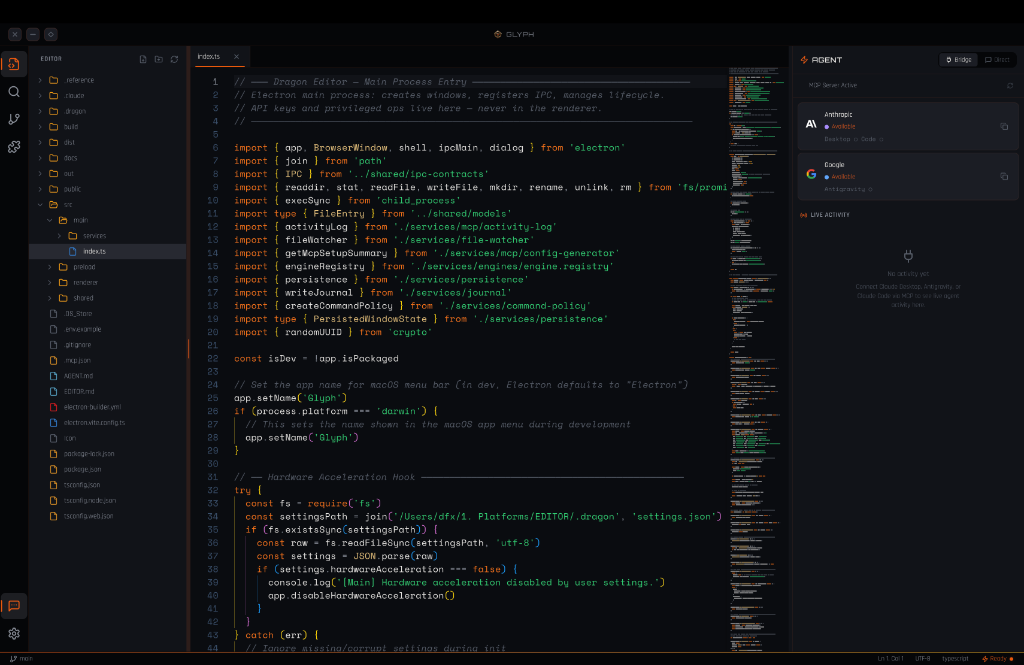
A standalone code editor with a built-in MCP server that bridges Claude Desktop, Antigravity, and Claude Code directly into your workspace.
// The Intelligence Layer
Bridged toClaude Desktop
Connected toAntigravity
Glyph runs a built-in MCP server with 8 workspace tools that Claude Desktop, Antigravity, and Claude Code connect to natively. Every tool call streams live into the Agent Panel's activity feed — file reads, writes, searches, and commands, all visible in real-time.
dragon_read_filestreamingdragon_search_filesconnecteddragon_write_fileconnected// Capabilities
What's Inside
MCP Bridge
Built-in MCP server with 8 workspace tools — Claude Desktop, Antigravity, and Claude Code connect natively.
Live Activity Feed
Every agent tool call streams into the Agent Panel in real-time — reads, writes, searches, and commands.
Direct Mode
Inline chat with Claude Opus, Claude Sonnet, Gemini 2.5 Pro, and Gemini 2.5 Flash — no context switching.
Monaco Editor
Full Monaco-powered editing with syntax highlighting, IntelliSense, and custom DragonSource theming.
Workspace Scoped
All operations sandboxed to your workspace. No credential sharing. No telemetry. stdio transport only.
Free Forever
No subscription tiers. No paywalls. Professional-grade tooling for every builder on earth.
Split Editor
Side-by-side editing with independent tab bars, cross-group tab dragging, and a resizable divider.
Source Control
Git staging, commits, branch display, and an integrated diff viewer — all without leaving the editor.
Integrated Terminal
Full PTY terminal via node-pty and xterm.js with WebGL rendering — shell, npm, git, all inline.
// Keyboard-First
Designed forSpeed
Every action is a keystroke away. Command Palette, Quick Open, and native macOS shortcuts — no mouse required. Tab pinning, split views, and ⌘⇧T to reopen closed tabs keep your flow unbroken.
// What's Next
On the Roadmap
// The Pipeline
Three Apps.Zero Trust
Glyph doesn't work alone. It's the host for an invisible pipeline that masks secrets before AI sees them and encrypts every file snapshot at rest. Three apps, one machine, zero network calls.
Glyph is available as a free download for macOS — a standalone Electron app with no subscription, no telemetry, and no account required. Bring your own API keys and connect your preferred AI engine.
// Inferno v2026.6.1
Download Available
Free. No account required.
macOS · Apple Silicon
Connect your AI Agent
To use Dragon's MCP security layer inside Antigravity, Claude Code, Cursor, or VS Code, add the following to your agent's MCP configuration. This routes tool calls through the Crypt daemon on port 7600.
{
  "mcpServers": {
    "dragon": {
      "url": "http://127.0.0.1:7600/mcp"
    }
  }
}
// The Arsenal
More Downloads
Every tool in the Dragon ecosystem is built with constitutional governance at its core. Sovereign software for sovereign builders.

Crypt
Encrypted Storage Engine
Military-grade encryption for your most sensitive data. Zero-knowledge encrypted storage with constitutional access controls built into the protocol.

Vault
Sovereign Key Management
Your keys. Your sovereignty. Vault delivers enterprise-grade key management and secrets orchestration with full constitutional governance and audit compliance.

Daemon
Autonomous Process Engine
Persistent background intelligence. Daemon runs autonomous services, scheduled workflows, and system-level operations under constitutional governance.

Ledger
Operations · Finance · Analytics
Financial command center for any organization — vendor expenses, revenue tracking, and a hierarchical Chart of Accounts with export to XLSX, CSV, ODS.